Pages

Showing posts with label developing. Show all posts

Thursday, December 9, 2010

How develop your Iphone game?

today I want to  focused on game developing with IPhone.

Best tool for develop IPhone  game is Xcode that you should

run it on mac.For windows and visual studio you can use

mono project and develop iPhone application with it but it is

not good as Xcode .

xcode3.2.3

In Xcode you have many template for building application.

For games you should chose opengles template and

start coding.in following post I’ll describe more about it.

what you need for developing IPhone application?comment it.

Thursday, December 2, 2010

windows phone 7 new jailbreak tool

Windows phone 7 comes with news developer tools

and attract more developer and of course more hacker!

today we have 3000 applications for windows phone 7

and it goings up,of course it is less than iPhone

applications and wp 7have ways to reach iPhone

wp7game

this week come with new jailbreak  tool for windows phone 7 that named ChevronWP7 allow developer and install new wp7 games and tools without going to Microsoft approval process.Of course Microsoft doesn’t like this tool .Now we should wait for new court and wars between Microsoft and hackers

Monday, November 22, 2010

first step to xna and XBOX programming

before xna and visual studio setup you should know that your graphic card must be compatible with xna that means you should have graphic card with diret3d that support xna framework Hidef profile. Also for using xna 4 you need have  visual studio 2010 .

visualstudioxbox


Now created project.you can use just visual c#.net language for create project .Next you’ll see environment like above.In left sidebar you have files  of project and in middle part you’ll see code of game.if you run project  a blue window will be appeared.you can changed it easily.Just  go Draw function and change this code  GraphicsDevice.Clear(Color.CornflowerBlue); to this one  GraphicsDevice.Clear(Color.Red); and you’ill see a red windows.For now it is enough Winking smile,in following posts you’ll see more

Saturday, November 13, 2010

start to develop android application

for developing android application you need download android sdk and eclipse and adt plugin .then create a sample project,when you run your applications it show your  result on simulator.

androidsimulator

result is something like this


androidsimulator2

now you want change string .Android application main language is java but coding is different from normal java mobile  program;you have main class that open main.xml file  in   layout folder.This xml file have LinearLayout,and textview nudes.in in textview nude you see this code:android:text="@string/hello" that define some values that contained in values folder .Its names is hello .change string and run it again.just this!Winking smilemore comes in next posts

resource:android developer guide

start to develop android applications

for developing android application you need download android sdk and eclipse and adt plugin .then create a sample project,when you run your applications it show your  result on simulator.
androidsimulator
result is something like this

androidsimulator2
now you want change string .Android application main language is java but coding is different from normal java mobile  program;you have main class that open main.xml file  in   layout folder.This xml file have LinearLayout,and textview nudes.in in textview nude you see this code:android:text="@string/hello" that define some values that contained in values folder .Its names is hello .change string and run it again.just this!Winking smilemore comes in next posts
resource:android developer guide

Monday, November 8, 2010

using keys in your games

images

when you want use keys  you should noticed that have many function

like keyPressed(int keyCode),keyReleased(int keyCode) ,keyRepeated(int keyCode) if you want use all of them should have something for control number of key pressing and releasing and repeating. with this code detect which key is pressed

int gameAction = getGameAction(keyCode);
switch(gameAction){
case UP:
key= "[UP]";
break;
case DOWN:
key= "[DOWN]";
break;
case LEFT:
key= "[LEFT]";
break;
case RIGHT:
key= "[RIGHT]";
break;
case FIRE:
key= "[FIRE]";
break;
case GAME_A:
message = "[LEFT_UP]";
break;
case GAME_B:
message = "[RIGHT_UP]";
break;
case GAME_C:
key= "[LEFT_DOWN]";
break;
case GAME_D:
key= "[RIGHT_DOWN]";
break;
default:
key= "";
break;

you can add all of code in same function.then define value like speed; we assume that in our game when you continue on  key press you have more speed so add this code after detect key “speed++”;But after checking speed in real device you see that you object move slower than emulator.it  because that device can’t process graphic like computer and emulator.You have to use timer functions and class in your games or using smaller graphic file in next post you see how do that


Tuesday, November 2, 2010

developing java touch games


iphone-finger-game

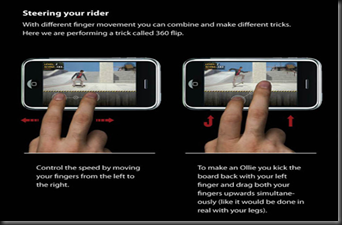
In game canvas you can detect keys and touch and using graphic function.Canvas have pre defined functions .For using touch in your game you have three function

protected  void pointerDragged(int x, int y) 
protected  void pointerPressed(int x, int y)
protected  void pointerReleased(int x, int y)

they are active when you dragged or pressed or released your finger(or pen) on your device.X and Y is place of your finger or pen.If you want same action for all of function you can define another function like this

public void doyouraction(int x,int y)
{

//add your code here

// you can change your function name(doyouraction)

}

in other hand you should have deferent code or functions

{} are keyword for define start and end of your codes.Public means that you can use your function in other class ,if you don’t want use private instead.After coding function use it with this codes

protected  void pointerDragged(int x, int y) 

{

doyouraction(int x,int y) ;
}

just this,in next post you’ll see infoo about detect keys and code for them

Friday, October 22, 2010

First view of java mobile app code and change it

When you build a java mobile game in software(like netbeans IDE or eclipse..)

first thing you‘ll see is  a middlet class .Middlet class used for handling start and

initialize and interface of java mobile applications. In netbeans you have sample

screen that can add button or text or image or like that .just you should drag your desired items from right side to screen and then go to source


netbeansscreen

screen is interface of your project in netbeans

For example you  have pre defined string seeing in screen and want changed it when middlet started. Code is like this

public void startMIDlet() {
       // write pre-action user code here
       switchDisplayable(null, getForm());
             stringItem.setText("my name is dawood");
       // write post-action user code here
   }

startMIDlet is function that using in every middlet .In netbeans for adding interface to screen using a form , should calling when middlet started.For this purpose have this code switchDisplayable(null, getForm());

and then add this for changing text stringItem.setText("my name is dawood");

and run it in emulator

emulator1

in start for do more thing in java games you should add canvas class that i’ll describe later

Friday, September 24, 2010

load 3d models into your game (part1)

Second step in  create mobile game is that create your environment.you can design your environment by 2d pictures  with sample paint game or
3573394595_925599a400
3d worlds with  best 3d  software. First you should know which game you want to build .  For  more games you should use 2d pictures and 3d worlds both.So if you want make sample games limit number of pictures and  3d worlds  and objects .Add them more time  into your game and change place of pictures  and objects and create new levels or increase them.
Shadow of Legend
for more complicated  and high graphic game  You should add 3d objects
and textured them into game.Add textured objects  forced to limit you in create levels and nice place(I’ll describe using texture and objects in following posts) and some  mobile  even have some crash in loading your objects.Textures that you used in games should be at last 64*64 or 128*128 .More higher pictures  can’t be loading in many mobiles and tools.But for background images you should now mobiles resolution or  using some important resolution.Change size of background image into game maybe disturb your image and you should accept risk of it.
TombRaiderLegend_lrg

Thursday, September 16, 2010

Which tools you use for create mobile games?


        Ok first you should know tools that used .  There is so many tools you can use for create mobile   games.But three of them are most important than others.Everyone have some profit and loose to others  and on base of your needs can use one of them.

1.NETBEANS

netbeans691

Netbeans is oracle tool for java programming(windows and mobile and..).Oracle bought  java and Netbeans from sun company .Netbeans

have visual library.It means that for create some tools like web tool and windows form you can drag library like button and forms and textbox and..to your program without code.But It can’t use for some mobile 3d games.

2.Eclipse

Eclipse is ibm tool for for java programming.Andriod officially support eclipse(not netbeans because oracle and google problem).Netbeans have also plugin for android but isn’t officially supported.Eclipse ide have also better plugin support from netbeans.

eclipse


3.microsot visual studio(express have no mobile support)

Best to for windows mobile programming but no java mobile support

visualstudio

now ready for programming!

linkwithin

Related Posts Plugin for WordPress, Blogger...